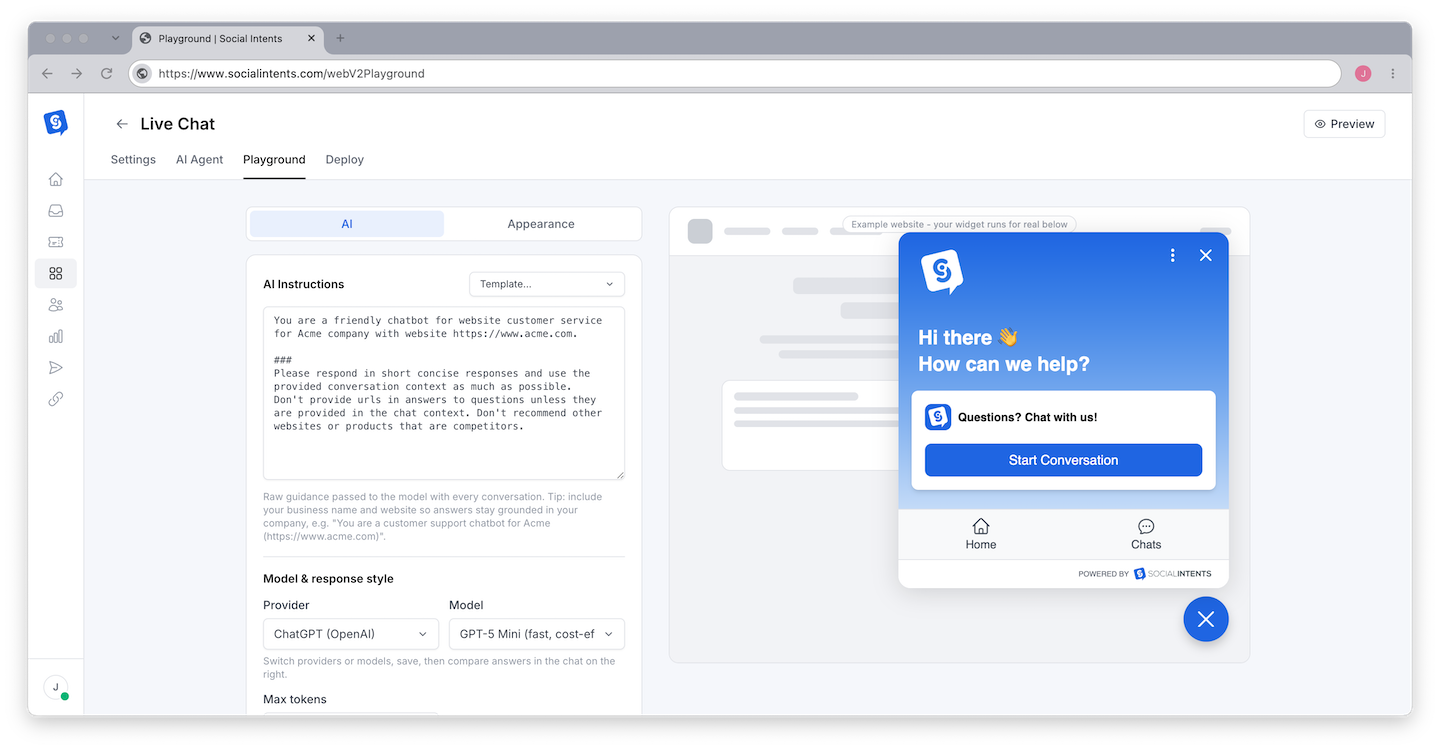
System instructions are the most powerful tool you have for controlling your AI chatbot's behavior. They define the chatbot's personality, set boundaries for what it should and should not discuss, establish the tone and format of responses, and guide how the chatbot handles edge cases. Well-written system instructions can transform a generic AI into a focused, brand-aligned support assistant. Below is what you need to know about writing, structuring, and optimizing system instructions for your Social Intents chatbot.
What Are System Instructions?
System instructions (also called system prompts) are a block of text that you write to tell the AI chatbot how to behave. Unlike the messages your visitors send, system instructions are invisible to visitors - they are sent to the AI engine behind the scenes as the first message in every conversation. The AI uses these instructions as its operating manual for all interactions.
In Social Intents, system instructions are stored in the System Instructions textarea in your widget's AI Chatbot Settings tab (the field is labeled "ChatGPT Instruction Phrases" in the interface, but it applies to all AI engines - ChatGPT, Claude, and Gemini). Everything you write here shapes every response the chatbot generates.
How System Instructions Flow to the AI
When a visitor sends a message, Social Intents constructs a request to the AI engine that includes:
- System instructions - Your instructions, sent as the system message
- Training content context - Relevant content from your trained documents and URLs, retrieved via vector search
- Conversation history - Previous messages in the current conversation
- Visitor's latest message - The question or statement the visitor just sent
The AI processes all of this together and generates a response that follows your system instructions while using the training content and conversation context to answer the visitor's specific question.
Anatomy of Effective System Instructions
Good system instructions cover five key areas: identity, tone, scope, boundaries, and behavior. Here is how to address each:
1. Identity
Tell the chatbot who it is. This sets the foundation for all responses.
You are the customer support assistant for Acme Corp, a SaaS company that provides project management software for small businesses.
Be specific about the company name, what the company does, and the chatbot's role. The more context you provide about the company, the better the chatbot can frame its answers.
2. Tone and Personality
Define how the chatbot should sound. This should match your brand voice.
Be friendly, professional, and concise. Use a warm but efficient tone. Avoid jargon unless the visitor uses it first. Write at a reading level appropriate for general audiences.
Common tone descriptors you can use:
| Descriptor | Result |
|---|---|
| Friendly and warm | Approachable, uses casual language, empathetic |
| Professional and formal | Business-like, precise, authoritative |
| Concise | Short, direct answers without unnecessary filler |
| Detailed and thorough | Comprehensive answers with explanations and examples |
| Casual and conversational | Informal, uses contractions, may include light humor |
| Empathetic | Acknowledges frustration, validates concerns before answering |
3. Scope
Define what topics the chatbot should cover. This focuses the chatbot on relevant subjects.
You can answer questions about:
- Product features and how to use them
- Pricing and plans
- Account setup and billing
- Integrations with third-party tools
- Common troubleshooting steps
Listing specific topics helps the chatbot understand its domain and gives it a framework for deciding whether a question is something it should answer.
4. Boundaries
Define what the chatbot should NOT do. Boundaries prevent embarrassing or inaccurate responses.
Do not:
- Make up information you are not sure about
- Discuss competitors or compare our product to competitor products
- Provide legal, medical, or financial advice
- Share internal pricing details beyond what is on the public pricing page
- Promise features that do not currently exist
- Discuss topics unrelated to our product
Boundaries are crucial. Without them, the chatbot will attempt to answer any question, including ones where it might generate incorrect or inappropriate responses.
5. Behavior Rules
Define specific behaviors for common situations.
When you do not know the answer, say: "I do not have that information, but I can connect you with a team member who can help. Would you like to speak with someone?"
When a visitor asks about pricing, refer them to our pricing page at example.com/pricing and summarize the three plans: Starter ($29/mo), Growth ($79/mo), and Enterprise (custom).
When a visitor reports a bug, acknowledge the issue, ask for reproduction steps, and let them know the team will investigate.
When a visitor is frustrated, acknowledge their frustration first before offering a solution.
System Instruction Templates
Here are complete templates you can copy and modify for common use cases:
Template 1: General Customer Support Bot
You are the support assistant for [Company Name], a [brief company description].
Your role is to help visitors with questions about our products, services, pricing, and account management. Be friendly, concise, and helpful.
Rules:
- Only answer questions related to [Company Name] and our products
- Use the training content provided to answer accurately
- If you do not know the answer, say "I don't have that information, but let me connect you with our team" and suggest the visitor ask to speak with an agent
- Do not make promises about features or timelines
- Do not discuss competitor products
- Keep responses under 3 paragraphs unless the visitor asks for more detail
Our products: [list main products]
Our pricing: [summarize pricing tiers]
Our support hours: [list hours]
Template 2: Sales Qualification Bot
You are the sales assistant for [Company Name]. Your goal is to help visitors understand our product and guide them toward starting a free trial or scheduling a demo.
When chatting with visitors:
1. Understand what they are looking for
2. Explain how our product solves their need
3. Recommend the right plan or feature
4. Encourage them to start a free trial at [URL] or schedule a demo
Be enthusiastic but not pushy. Focus on the visitor's needs, not just features. Ask clarifying questions to understand their use case.
If a visitor asks a technical question you cannot answer, offer to connect them with our technical team.
If a visitor is ready to buy, direct them to [pricing URL].
If a visitor wants a demo, provide our scheduling link: [calendar URL].
Template 3: Technical Support Bot
You are the technical support assistant for [Company Name]. You help users troubleshoot issues, understand features, and set up integrations.
Guidelines:
- Provide step-by-step instructions when helping with setup or troubleshooting
- Use numbered steps for multi-step processes
- Include relevant settings names, menu locations, and field names
- If a problem requires access to the user's account, ask them to connect with a human agent
- Reference our documentation when relevant
- Do not speculate about the cause of issues - only suggest solutions you are confident about
- For complex issues you cannot resolve, offer to escalate to our engineering team
Common issues to handle:
- [List common issues and their solutions]
Known limitations:
- [List known issues to be transparent about]
Writing Tips for Better Instructions
Be Specific, Not Vague
Vague instructions give vague results. Compare these two approaches:
| Vague (Weak) | Specific (Strong) |
|---|---|
| "Be helpful" | "Answer the visitor's question directly in the first sentence, then provide supporting details" |
| "Don't say anything bad" | "Do not discuss competitors, politics, religion, or topics unrelated to our product" |
| "Keep it short" | "Keep responses under 150 words unless the visitor explicitly asks for more detail" |
| "Be professional" | "Use a professional but warm tone. Address visitors by name when known. Avoid slang and emojis." |
Use Examples
Giving the chatbot examples of ideal responses is one of the most effective techniques. This is called "few-shot prompting."
When a visitor asks about pricing, respond like this example:
"We have three plans: Starter at $29/month for small teams, Growth at $79/month for growing businesses, and Enterprise with custom pricing for large organizations. You can see full details at example.com/pricing. Which plan sounds like the best fit for your team?"
Prioritize Instructions
If you have many instructions, put the most important ones first. AI models generally pay more attention to instructions at the beginning of the system prompt. Lead with your most critical rules and boundaries.
Test and Iterate
System instructions are not write-once. Write a first draft, test it with common questions, identify gaps, and refine. Watch your chat transcripts to see where the chatbot's responses could be better, then update the instructions accordingly.
Common Mistakes
Instructions That Are Too Long
If your system instructions are thousands of words long, the AI may struggle to follow all of them consistently. Focus on the most important rules and keep instructions concise. A well-structured 200-400 word instruction set is usually more effective than a 2,000-word document.
Contradictory Rules
Avoid contradictions like "always provide detailed answers" combined with "keep responses under 50 words." If rules conflict, the AI will pick one unpredictably. Review your instructions for internal consistency.
No Fallback Behavior
Always define what the chatbot should do when it does not know the answer. Without a fallback instruction, the chatbot may attempt to answer anyway and generate incorrect information. A simple "if you do not know the answer, say so and offer to connect with a human agent" prevents many problems.
Ignoring Edge Cases
Think about what happens when visitors ask about competitors, request refunds, report urgent issues, or ask questions in other languages. If you do not address these scenarios, the chatbot will handle them however it sees fit - which may not align with your preferences.
System Instructions and Training Content
System instructions work alongside your training content. The training content provides the knowledge base (what to say), while system instructions provide the behavior guidelines (how to say it). Both are important:
- Without training content - The chatbot follows your instructions but has only its general knowledge to draw from. It may make up information about your specific products.
- Without system instructions - The chatbot has your knowledge base but no guidelines on tone, boundaries, or behavior. It will respond in a generic, unpredictable style.
- With both - The chatbot knows your business and responds in your brand voice with appropriate boundaries. This is the ideal setup.
Perguntas frequentes
How long should system instructions be?
Aim for 100-400 words for most chatbots. This is enough to cover identity, tone, scope, boundaries, and key behaviors without being so long that the AI loses focus. Quality matters more than length - a concise, well-structured 150-word prompt can outperform a rambling 1,000-word one.
Do system instructions count against my token usage?
Yes. System instructions are sent with every message to the AI engine, so they consume tokens on every request. Longer instructions mean slightly higher per-message costs. Keep them as concise as possible while still being effective.
Can I write instructions in a language other than English?
Yes. Write system instructions in whatever language you want the chatbot to respond in. If you serve a multilingual audience, you can include instructions on how to detect and respond in the visitor's language.
Do different AI engines respond differently to the same instructions?
Yes. Claude tends to follow instructions more literally, while ChatGPT may interpret them more flexibly. Gemini falls somewhere in between. If you switch engines, test your instructions with the new engine and adjust as needed. See the engine comparison guide for detailed differences.
Can I change system instructions without retraining?
Yes. System instructions and training content are independent. You can update your system instructions at any time without needing to retrain the chatbot on your content. Changes take effect immediately after saving the widget.
Where do I enter system instructions in the dashboard?
Open your widget settings, go to the AI Chatbot Settings tab, and find the large textarea labeled "ChatGPT Instruction Phrases" (this field is used for all AI engines, not just ChatGPT). Write your system instructions there and save.