
Integração de API personalizada
Conecte seu chatbot de IA a qualquer API externa. Obtenha dados, crie registros, acione webhooks — integre-o aos seus sistemas personalizados.
O que é integração de API personalizada?
A integração personalizada da API permite que seu chatbot de IA se conecte a qualquer API REST ou webhook. Você pode obter dados em tempo real, como níveis de estoque, criar registros em qualquer sistema, acionar automações, enviar notificações ou integrar-se a sistemas comerciais proprietários.
A configuração básica pode ser feita através da nossa interface visual, configurando pontos finais e parâmetros. Para integrações mais complexas que envolvam transformação de dados ou lógica condicional, alguns conhecimentos técnicos podem ser úteis.
Recursos da API
Solicitações GET
Obter o status do pedido, informações da conta, níveis de estoque e preços.
Solicitações POST
Crie tickets, leads, pedidos, envios — qualquer registro.
Webhooks
Acionar fluxos de trabalho no Zapier, Make, n8n ou no seu backend.
Autenticação
Chaves API, OAuth, tokens portadores, cabeçalhos personalizados.
Mapeamento de respostas
Analise respostas JSON e utilize os dados em mensagens de bot.
Tratamento de erros
Recursos elegantes para quando as APIs falham ou atingem o tempo limite.
Veja em ação
In this example, the chatbot calls a weather API to look up current conditions when a visitor asks “What’s the weather in Denver?”

Configuração passo a passo
Go to AI Chatbot Settings → AI Actions and click Add Action. Configure the fields below to connect your API.
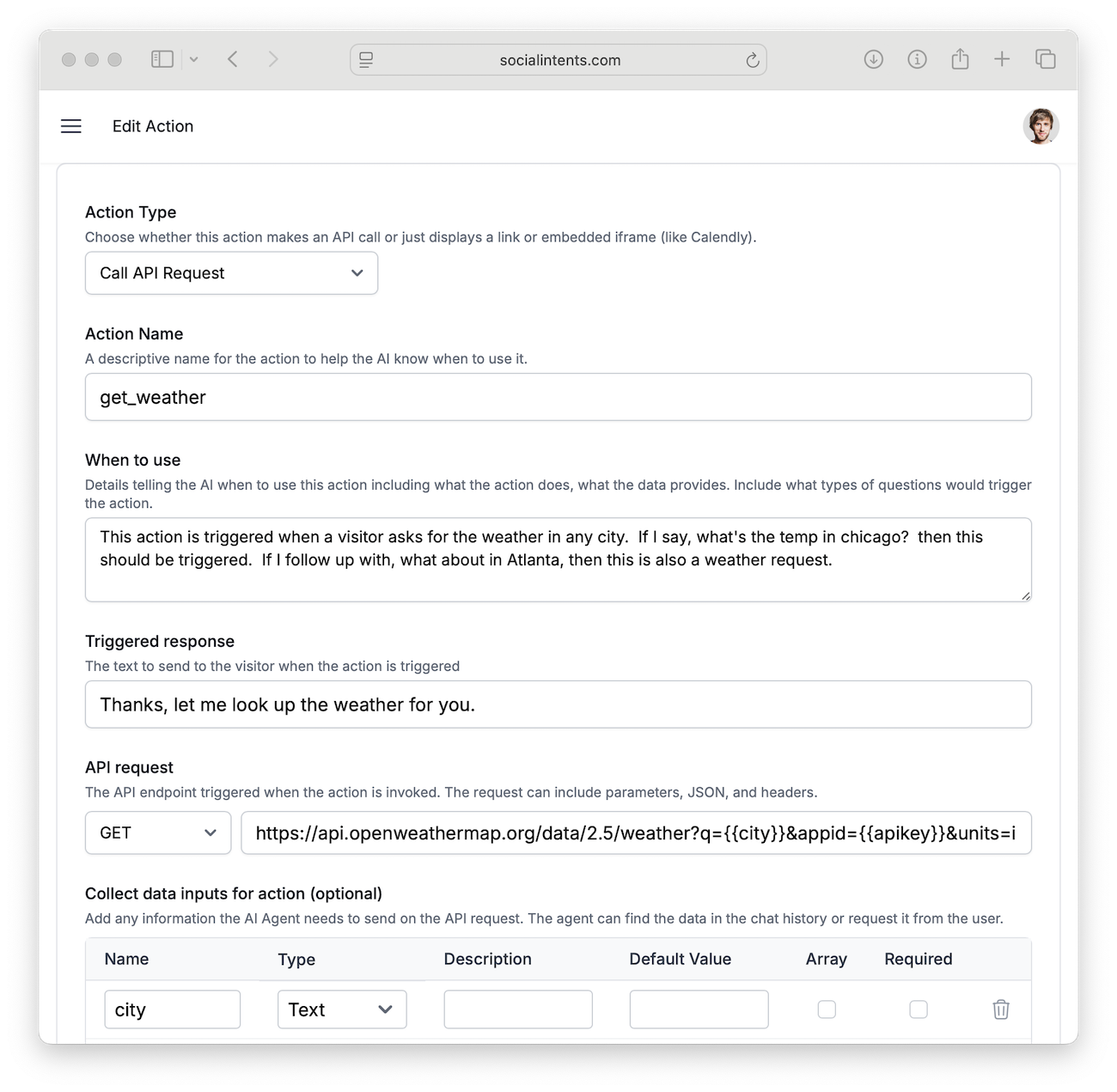
| Campo | Description | Example |
|---|---|---|
| Tipo de ação | Choose Call API Request to make an HTTP call when the action fires. |
Call API Request |
| Nome da ação | A unique function name. Use snake_case. | get_weather |
| Quando usar | Natural-language description of when the AI should call this API. | When the user asks about current weather conditions |
| Collect data inputs | Data to gather before calling the API. These become {{variable}} placeholders in the URL. |
city, apiKey |
| API URL | The endpoint to call. Use {{variable}} template syntax to inject collected data. |
https://api.openweathermap.org/data/2.5/weather?q={{city}}&appid={{apiKey}} |
| HTTP Method | GET for retrieving data, POST for sending data. | GET |
| Headers | Optional HTTP headers (e.g., Authorization). One per line in Key: Value format. |
Authorization: Bearer sk-xxx |
Example Use Cases
Pesquisa de clima
Let visitors ask “What’s the weather in Denver?” and get a live answer.
GET https://api.openweathermap.org/data/2.5/weather
    ?q={{city}}&appid={{apiKey}}&units=imperial
Order Status
Visitors provide an order number, the chatbot calls your order API and returns the status.
GET https://api.yourstore.com/v1/orders/{{orderId}}/status
Headers:
  Authorization: Bearer {{apiToken}}